
 Contact us
October 7,2021
Magento 2 Guide: Creating a Grouped Product

A grouped product, is one of the four main product types in Magento, and looks like this (learn more about Magento product types).

You would use this where you have multiple options for a product, where someone would normally buy each option as opposed to a singular one. Products such as piping, screws and bolts are ideal for this, as the customer can add as many of each product to their basket in one go.
For the purposes of this example, we’ll be creating a suit product, which will list the jacket, shirt and trousers, they can all be bought together or you can buy the elements of it you want.
To start with, we need to create your simple products, one for the suit jacket, one for the shirt and one for the suit trousers.
Once you have created these, we can start our grouped product.
Need help with Magento?
We are experts in Magento, with experienced designers, developers & marketers. If you need a hand, get in touch.
Creating a Grouped Product
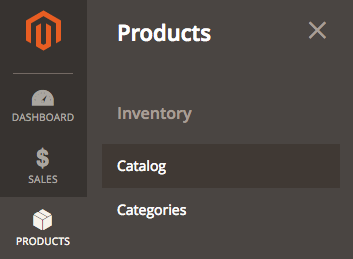
To start with, we’ll start by heading to Products > Catalog.
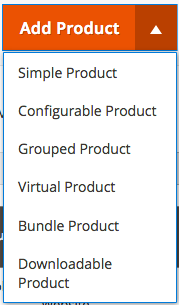
Here, we’ll click the dropdown next to Add Product and select Grouped Product.
Now we’ll be taken to where we need to enter the essentials for the product, such as name, SKU, images and so on. This will be the same process as adding a simple product, except a grouped product will not have a Price or a Stock Quantity, these are defined by the simple products we created earlier.
Once we’ve filled in the essentials, we’ll get to a section called Grouped Products.

Click on the Add Products to Group button and you’ll see a table with a list of products on the website.
Filter these to find the simple products created earlier, ticking the checkboxes on the left and click the Add Selected Products button. This will associate these with the grouped product.

Now you will end up with a table showing the selected group products, here you can change the default quantity that will be selected when a customer visits the page, normally you’d either have these set to zero or one.

And that’s all there is to it, well done, you’ve added a Grouped Product in Magento 2
We are a experienced Magento Agency, working with brands both large and small. If you need any help with your Magento Store, get in touch with us today!